Gonto, the new dependency manager from WanadevStudio

At WanadevStudio, we develop video games using Unreal Engine. On a daily basis, we have to juggle multiple engine versions, depending on the projects but also on the target platforms (PC, VR headsets, PlayStation, Android, iOS, etc.). After spending far too much time managing Unreal versions installed both on developers’ machines and on our build servers, we eventually created a tool to simplify our workflow.
Today, we’re introducing Gonto, the tool we built and have just opened so it can benefit everyone.

The nightmare of manually managing Unreal Engine versions
Before diving into Gonto, here’s some context on how we used to handle Unreal versions.
Our studio teams work on many games in parallel. This includes both ongoing projects and older titles that we continue to maintain. Almost every project uses its own version of Unreal Engine. Sometimes these are standard versions, but more often they are custom builds required to support specific platforms.
These engine versions typically weigh over 100 GiB, and often closer to 150 GiB. Until now, we stored them as Zip archives on a network share, which caused several issues.
When a developer or an artist needed to work on a project, they had to:
identify the correct engine version
download the Zip
extract it, which required both significant disk space (you need twice the space to store the Zip and the extracted files), and time (it could take hours in certain configurations)
add registry keys manually to complete the setup
and figure out which scripts to use and how
Similarly, the infrastructure team had to manually deploy each Unreal version used by active projects across all build machines (machines that compiles nightly builds and final builds for players).
All this overhead was time-consuming and frustrating for the teams: "Oops, the engine version I need isn't on the servers! 😑️", "Argh! I'm running out of disk space! 😅️",...
Gonto to the rescue
These problems aren’t inevitable. That’s why Wanadev’s Studio and Infra teams worked together on a solution. Three valiant developers, Benoît, Jérémy, and Fabien, embarked on the adventure, tackling the darkest (and undocumented) Windows APIs to bring Gonto to life.
Disk images instead of ZIPs: the key to efficiency!
The first problem to tackle was Zip archives. Could engine versions be distributed in a more efficient way?
After some research, the answer was yes. Windows has been able to natively use disk images for several years now. Disk images are like hard drives that can be plugged into and unplugged from the PC at will, except that instead of being physical hardware, they are simply (large) files.
This means Unreal Engine can be distributed as ready-to-use disk images. No extraction required anymore. You just download a file and mount it on a drive letter (for example U:\).
And voila! No need to have twice the disk space available anymore; only the disk image takes up space. And no more waiting for hours to extract files, they're immediately accessible.
Automated dependency management for simplicity
The second problem tackled was automatically retrieving the required Unreal version (and other required tools).
With Gonto, each project explicitly declares its dependencies in a dedicated configuration file. For example:
- Unreal Engine 5.4.4 custom build for Meta,
- and Android SDK version 36 (with the appropriate Java version).
Gonto automatically downloads the corresponding disk images and performs all necessary setup steps such as mounting images, setting environment variables, and configuring registry keys so that the machine is ready to work on a project.
This approach also avoids having multiple conflicting versions of dependencies installed simultaneously, which was a common source of issues before!
Standardized scripts for consistency
And then the final boss: the standardization of projects.
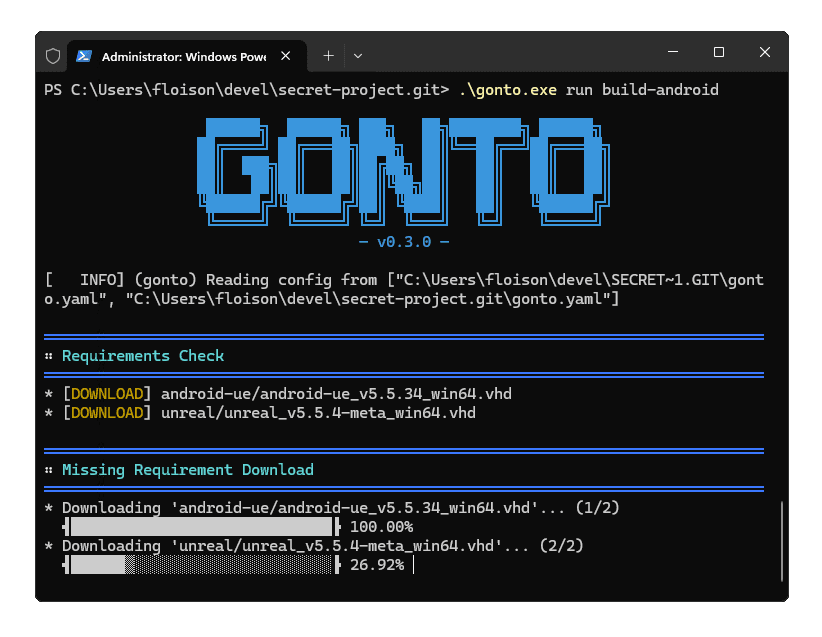
Instead of each project having its own scripts and workflows, Gonto acts as an orchestrator. It provides targets that allow you to prepare a machine or compile a project from start to finish, in a single command, always the same regardless of the project.
For example, to build an Android version of Ragnarock, you can use the following command:
gonto.exe run build-android
Gonto will:
read the project configuration and locate the
"build-android"target,download dependencies (Unreal and Android SDK) if not already cached,
mount disk images and prepare the environment (define the correct environment variables and registry keys),
execute the build scripts,
- and finally unmount disk images to restore the machine to its original state.
If, instead of compiling the game, you only want to prepare a developer's machine so they can work on the project, then you need to use a slightly different command:
gonto.exe mount build-android
In that case, Gonto performs similar steps but keeps the disk images mounted permanently and skips the build scripts execution.
Gonto is now free: the journey continues!
Gonto is already deployed across almost all of our studio projects and is now being adopted by other teams like YouRescue, who face similar challenges managing Unreal Engine versions on Windows.
As mentioned earlier, we decided to share Gonto with the community because we believe it can help other studios. You can find it on our GitHub:
Feel free to check it out if it could be useful for you. Don't hesitate to open an issue or drop us a line on our Discord server if you have any questions or feature ideas! 😄️
Discover more news
Gonto, the new dependency manager from WanadevStudio
We develop video games using Unreal Engine. On a daily basis, we have to juggle multiple engine versions, we created a tool to sim...
Devlogs as a tool to build proximity with players
As a result, the devlog is a healthy and effective way to avoid a mismatch with players who are not looking for the type of experi...

Species: Unknown is a nominee for the Pégases 2026!
Species: Unknown is a nominee for the Pégases 2026!